Spread Knowledge With Simplicity..................

Blogroll

Saturday, September 27, 2014

What is RDBMS Lecture -4

What is RDBMS

DBMS:-
                    Data base management system (DBMS) which follows all the 12 rule given by  Dr Edgar F. Codd  known as Relational data base management system (RDBMS)

According to Dr.Edgar F codd rule are as follows

1 Information Rule :- 

                                        This rule states that all information (data) ,which stored in database must be stored in table  formats,this information can be user data or meta -data.

2.Guaranteed Access rule :-

                                        This rule states that every single data element (value) is guaranteed to be accessible logical with combination of table name and primary key .

3.Systematic Treatment of NULL value:-

                      This rule states that NULL value in the database must be given systematic treatment i.e. primary key value never be NULL because NULL have several meaning that cause various anomaly occurs in data base

4.Active online catalog :-

                                      This rule states that the structure of whole database must be stored  in an online catalog i.e. Data Dictionary

5. Comprehensive data sub-language rule :-

                                     This rule states that  database must have support for a language which has linear syntax which is capable of Data Definition ,Data Manipulation,Data control  

6.View Updating rule:-

                               This rule states that all system should able to updates all views of database  without any anomaly in the system

7. High-level insert -Update and Delete rule:-

                               This rule states that system must support high level insertion,updation ,deletion this must not be limited to a single row that it must support join operations to yield set of data

8. Physical data independence:-

                              This rule states that application should not have any concern about ,how the data physically stored in the system as well as any change in physical structure must not have any impact on application 

9.Logical Data Independence:-

                            This rule states that logical data must be independent of its user's view as well as any change in logical data must not imply any change in the application .e.g. if two table are merged or one is split into two different table there should be no impact on the application

10.Integrity Independence:-

                               This rule states that all integrity constraints can be independently modified without the any change in the application.this rule makes database independent of front-end application and its interface.

11.Distribution Independence:-

                      This rule states that the end user must not be able to see that the data in distributed over various locations,end user have feel that data is located at one site only. 

12. Non-subversion rule:-

                              This rule states that if system has an interface that provides access to low level records ,this interface then must not be able to subvert the system and bypass security and integrity constraint 

Share:

DBMS Data Independence Lecture -3

 Data Independence 

Data independence can be define as the capacity to change the schema at one level of data base system without having to change the schema at higher level .data independence further classified into to category as follow

1.Logical Data Independence

2.Physical data Independence

Logical data Independence:- 

                                            The capacity to change the conceptual Schema without having to change the external schema or users programs

Physical data Independence:-

                                                  The capacity to change the the internal Schema without having to change the conceptual schema


Share:

Database Management system (Advantage of DBMS over flat file system) Lecture -2

Advantage of DBMS over flat file system

1. Easy to Access [ By Indexing ]

2.Gives less I/O task to Access data 

3. It gives more concurrency level

4.More Security over the data File [By providing Views]

5. Data Independence [By providing three level Interdependency]

6.Data Integrity and Security

7.Data Administration

8.concurrent Access and crash recovery 

9.Control Redundancy [Duplication  of data]

10.Reduced Application Development time [By providing Higher level Interface]

Click Here for previous Lecture -1

Share:

Tuesday, September 16, 2014

Data Base Management System Made easy class room note Lecture -1

Data Base Management System Made easy class room note  Lecture -1

DBMS syllabus and reference for GATE 
Databases:   
              Relational model (ER-model, relational algebra, tuple calculus), Database design (integrity constraints, normal forms), Query languages (SQL), File structures (sequential files, indexing, B+ trees), Transactions and concurrency control;
Reference Book:-

   Database Management systems  –>   Raghu RamaKrishnan
   Database system concepts  – > Silberschatz , Korth , Sudarshan
   Database systems   – >    C.J.Date (Normalisation is very lucidly written )
   Principles of Database Systems – > J.D.Ullman  (This is a very good book )
------------------------------------------------------------------------------------------------------

 Note:-

As per analysis of GATE previous years papers  found that all the topics of the above syllabus are important so i suggest you go through all the topic but as per previous GATE paper experience probability of occurring question are more from -Normalization,normal form relation algebra, SQL query and transactions and concurrency .

Once you will go through old paper you will find that maximum time 2 question (link question) asked from SQL query only or normalization (normal form) and one marks question from rest of the syllabus so focus on these two topics  so in our lecture we will cover these topic first .
--------------------------------------------------------------------------
What is DBMS?
                           Before understand DBMS we understand some basic terminology
Database:-  Database is a collection of related data
Management System:-  A software used to manage the database in efficient way
                DataBase+Management Syatem  =DBMS
DBMS Definition:-  Database is a computer base record keeping system and the way through which we manage the system known as management system
DBMS Definition by Korth:-

                                       A Database management system is a collection of interrelated data and set of programs to access these data.

DBMS Defination by Ullman:-

                                      DBMS is powerful tool for creating and managing large amount of data efficiently and allowing it to persist over long period of time.


Share:

Saturday, September 13, 2014

Introduction of Java Programming (Basic Introduction) Lect-1

Introduction of Java Programming 

Key Note :-
  • Before start Java programming you have to understand that how to learn java ,what strategy required to learn java because there are lot of book available in market/Internet for java which only provides you content but no book tell us that how to start /how to read /what are the right track for learning java programming 
  • Second point which comes in your mind that to learn  java what kind of programming background required i.e. whether C/C++ mandatory to learn before start java .
  • I frankly tell you that for java there is no need of background knowledge of C/C++,but if know its fruitful for you.
  • The next  thing comes to your mind that why Java where various programming language available in the market?
  • Later on  I  will give many reason why java only
Share:

Tuesday, June 17, 2014

Introduction of java Lect-2


Introduction of java Lect-2

What is Java?

            Java is Pure Object  Oriented  platform Independent  (Architecture neutral) Language  developed by James Gosling from Sun Micro system(sun)in 1991. The first publicly available version of Java (Java 1.0) was released in 1995.
  
Note:-   Java technology is both a programming language and a platform. 

Note:-   Sun Microsystems was acquired by the Oracle Corporation in 2010

Note:-   Over time new enhanced versions of Java have been released.

Note:- The current version of Java is  Java 1.7 which is also known as Java 7

Note:- From the Java programming language the Java platform evolved.

Note:- The Java platform allows software developers to write program code in other languages than
         
             the Java programming language.

  History of Java Language

  • In 1991 a group of Sun Microsystems engineers Led by James Gosling ,decided to develop a  Language for consumer device (Like- cable Box, Microwave ,Washing Machine etc)  
  • They Wanted the language to be small because  these device don’t’ have powerful CPU.
  • They also wanted the language to be hardware independent since different manufactures would use different CPU.
  • The project was Name Green….
  • They decided to compile the code to an intermediate machine like code for imaginary CPU called Virtual Machine (VM),actually there is a real CPU,that implement this virtual CPU
  • This intermediate code called Byte Code
  • Byte code Completely Hardware Independent
Share:

Thursday, January 23, 2014

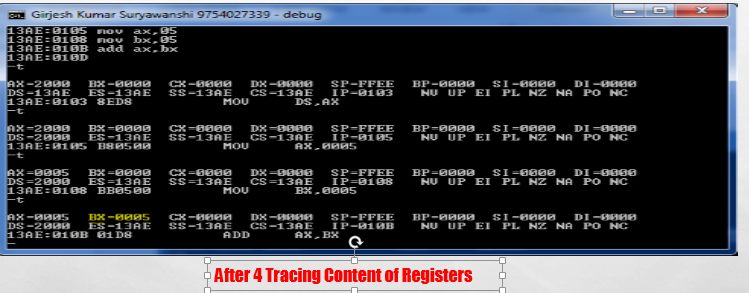
step by step procedure to perform addition of two number in Assembly language using debugger Lecture-3

Lecture -3

  Addition Program in Assembly Langauage

step by step procedure to perform addition of two number in Assembly language using debugger..


Note :-If you want to do Assembly Language programming then  you to follow following Step

step:-1

  • Open Command prompt type debug and press enter 


 step:-2

     After pressing  enter type  (a) to change debugger into assembly language mode


 step:-3
 
Step:-4  Initialize data Segment

Step:-5

Step:-6

Step:-7


 Step:- 8 Perform tracing by pressing  t continue and view content of registers


Share:

Tuesday, January 21, 2014

Introduction of assembly language Lecture -2

Introduction of assembly language  Lecture -2


Lecture -2

Assembly Language:-

                                In Assembly language mnemonic code  (ADD, SUB, MUL)

are used in place of large machine instruction.so user don't have to remember large 

set of instruction for performing different operation. e.g.

                                5                                                  101
                            +  5                                  ADD       101
                          ---------                          --------------------     
                               10                                               1010

Note :-If you want to do Assembly Language programming then  you to follow following Step

step:-1

  • Open Command prompt type debug and press enter 


 step:-2

     After pressing  enter type  (a) to change debugger into assembly language mode


Share:

Learn C programming online/ Learn C programming in 21 Days

Learn C programming online

Lecture -1 

Basic Understand of Computer and its Language

Note:-If any one want to start learn "c" Programming then He/She have to remember following things.

  • First very important that It required patience in you.
  • Keen Interest for programming .
  • You to ask question that from where we have to start .
  • What is the right way to learn C programming .
  • It doesn't Requires Any Coaching ,the thing which is required is your effort.
  • How Important  It is . 
  • Be-live me if you learn  "C" then you don't need to learn any other language.
  • There are lot of books available in market for "c" ,but not a single book which tell us that how to read and learn
  • Here i will provides you step by step procedure to learn "c" Programming. 

Step :-1

Understand the Definition of Computer/What actually Computer is?

Definition:- 

Computer is a Electronic device ,which takes Data and Instruction as input from user and perform processing over it and generates desire output.Here i want to coin out some term like data (fact,figure,information,from user)and instruction indicates what operation computer have to perform over input data and How it have to perform.

Needs of Languages:-

like in Human being if they want to communicate with each other they required a common language which is understand by both the party,then only communication is possible.

Same as If you want to communicate with Computer (M/C) you have to communicate in computer language i.e. Machine language (0101010)...

Note :- So What you think which language is used first to communicate with computer 

Machine language only..

Machine Language:-

                                       Machine Language also called Low level language in which binary number (010101) is used to write instruction for computer.
for example if you want to write simple program for addition of two number then

suppose you want to perform addition of 5 and 5 then first you have to provide binary equivalent of five to machine and then instruction for addition which again written in machine language
.e.g.

                                                                      Figure :-1

Machine Language Programming Have various advantage And Disadvantages

  Advantages of Machine Language:-

  • Execution time of program is very less Because it doesn't Requires any translator.
  • Better Hardware Interaction Because it close to Hardware.
  • Provide Real time Interaction to the users.

Disantages of Machine Language:-

  • Not user Friendly because user have to remember large set of instruction which are written in binary language.
  • It Doesn't provide Abstraction 
Note :- To overcome the limitation of Machine Language a new language come into the picture known as Assembly language.

Share:

BTemplates.com

BTemplates.com

Contact Us

Name

Email *

Message *

Labels